Choosing B-Roll For A Faceless Video When You Do Not Speak The Narration Language
The part of faceless production people ask me about least is the part that decides whether a video works: which picture goes under which line. Everyone worries about the voice model, the thumbnail, the script. Almost nobody worries about shot selection, and shot selection is where most of the boredom in a mediocre video actually lives.
It gets harder when the narration is in a language you do not speak fluently. If you are producing for an English-speaking audience and English is not your first language, you can end up staring at a timeline listening to a voice track you only half follow, guessing at clips. That guessing is what makes a video feel like a slideshow.
Here is how I handle it, and it has very little to do with language ability.
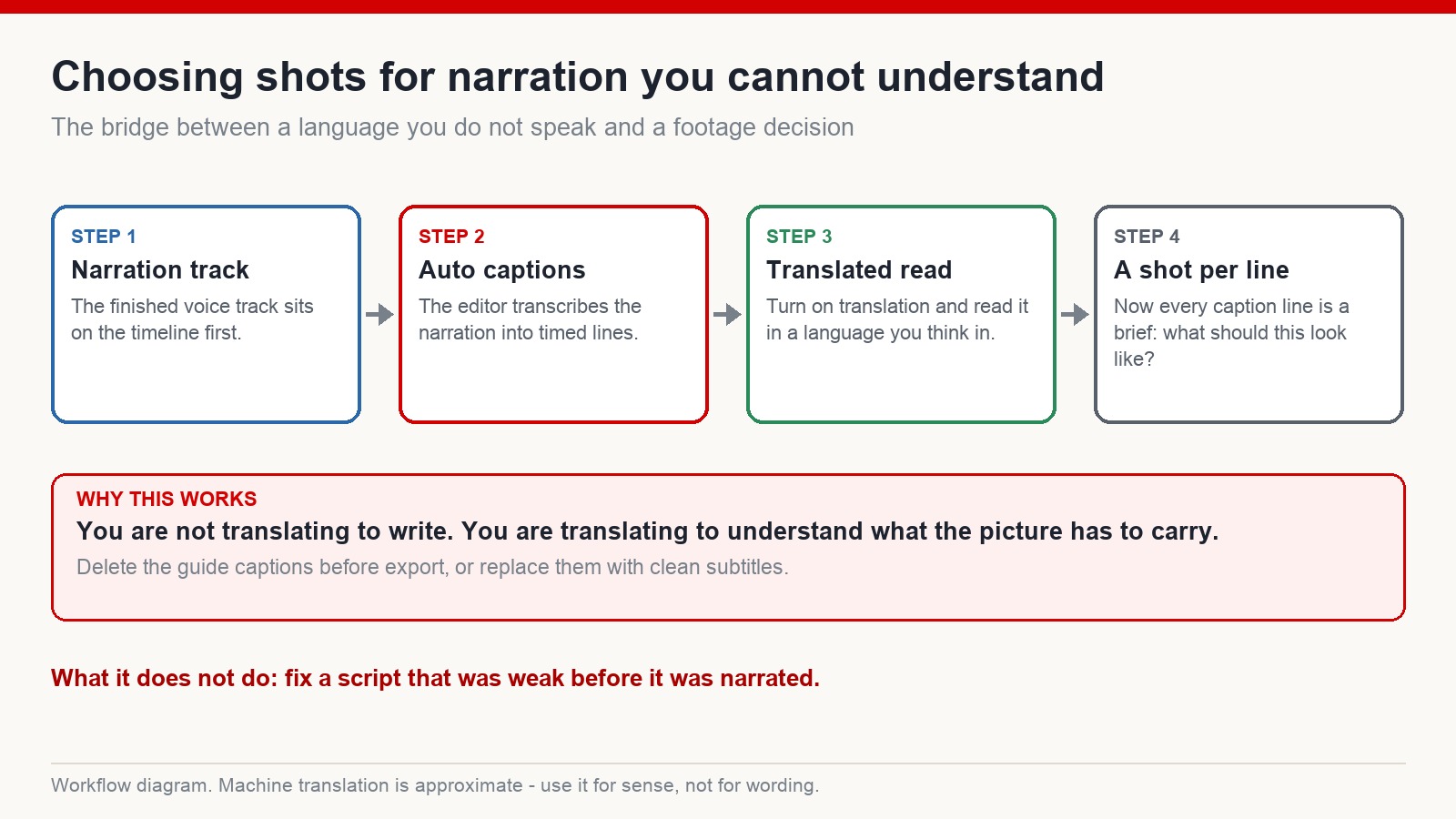
Build a bridge before you touch a single clip
The trick is not to improve your English. It is to convert the narration into something you can read carefully at your own pace, in a language you think in.
Modern editors will transcribe a voice track into timed caption lines in a couple of minutes, and most of them will run a machine translation of those lines on request. Turn both on. Do not do it for the audience – do it for yourself. What you end up with is the narration broken into short units, each one anchored to a timecode, each one readable.
Now the timeline is not an audio waveform you are guessing against. It is a list of briefs. Line one needs a picture. Line two needs a picture. You know what each line means, so you can decide.
Two honest caveats. Machine translation is approximate – it gives you the sense of a line, not the wording, so never use it to check whether your script reads well. And delete the guide captions before you export, or replace them with properly formatted subtitles. They are scaffolding.
Stop matching words. Start matching register.
The most common mistake I see in faceless edits, from creators at every level, is literal matching. The narration says “the harbour”, so the editor cuts to a harbour. It says “she left”, so we get a shot of a person walking away.
Do that for eight minutes and you have made a picture dictionary. Nothing accumulates. There is no reason to stay.
The better question is not what the line says but what the viewer should feel while hearing it. Shots have a register the same way sentences do, and the register is carried by three things: how fast the frame moves, how much of the frame is empty, and how long you hold the shot before cutting.
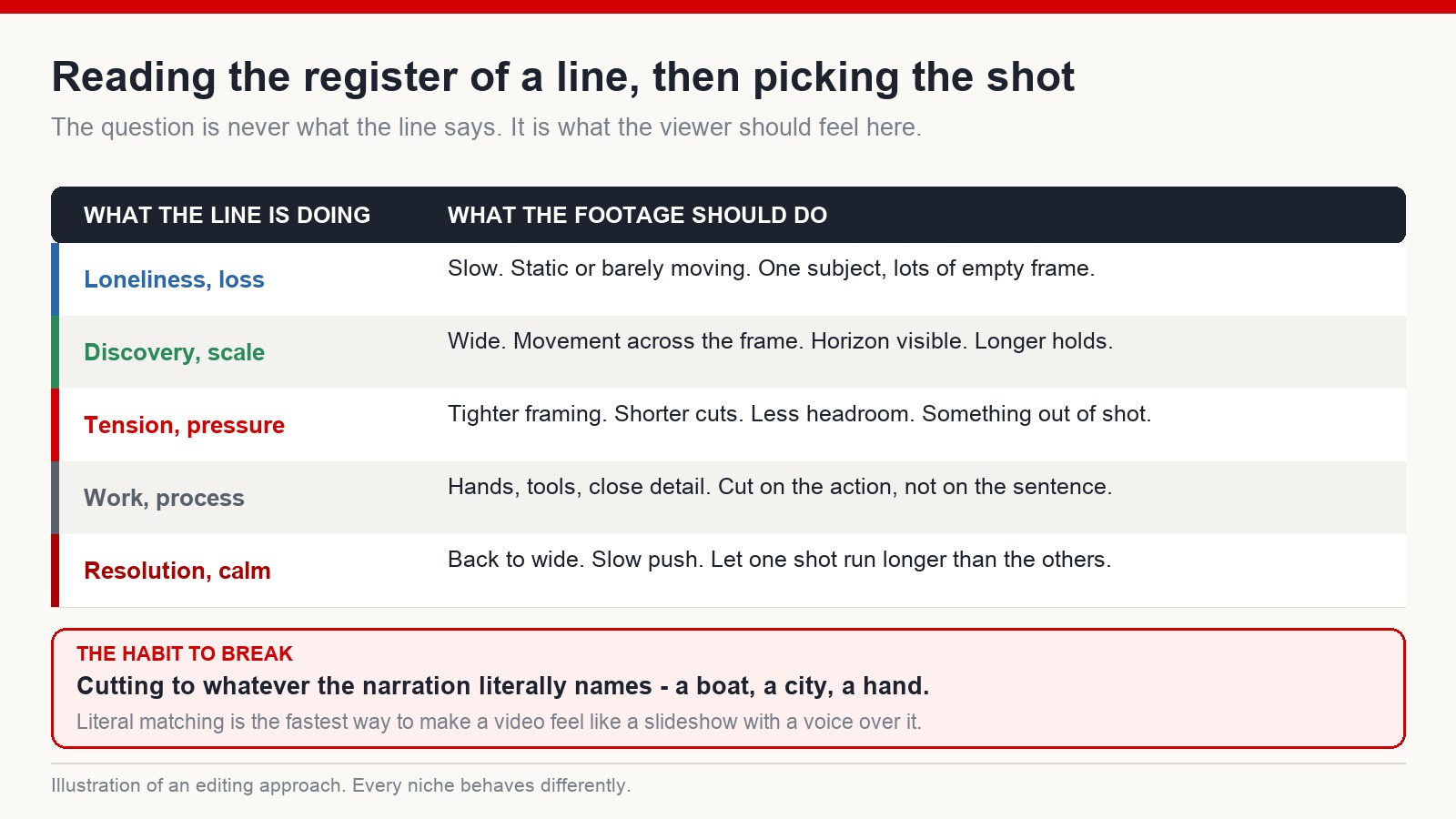
A line about isolation wants a slow shot, a single subject, and a lot of empty frame around it. A line about scale or discovery wants width, movement across the frame, a visible horizon, and a longer hold so the viewer has time to look around inside the picture. A line about pressure wants tighter framing and shorter cuts – less headroom, something happening just outside the shot.
None of that requires understanding the sentence word for word. It requires knowing what the paragraph is doing. Which is exactly what your translated caption pass gave you.
Cut on the action, not on the sentence
A second habit worth building: your cuts do not have to land where the sentences land.
If every cut arrives at a full stop, the edit develops a metronome quality that viewers feel even if they cannot name it. Let a shot start a beat before the line that goes with it. Let another one run two seconds past the end of its sentence. Let the picture arrive slightly ahead of the words describing it, so the narration confirms what the viewer has already started to notice.
This is the single change that most reliably makes an amateur edit feel deliberate, and it costs nothing.
Where the footage comes from matters more than how it looks
You can make all the right shot choices and still lose the channel, if the shots are not yours to use.
This is the part new creators underestimate. It feels like a paperwork problem, so it gets postponed. It is not a paperwork problem. It is the difference between a library that keeps working for years and a library that becomes a liability the moment a rights holder decides to enforce something.
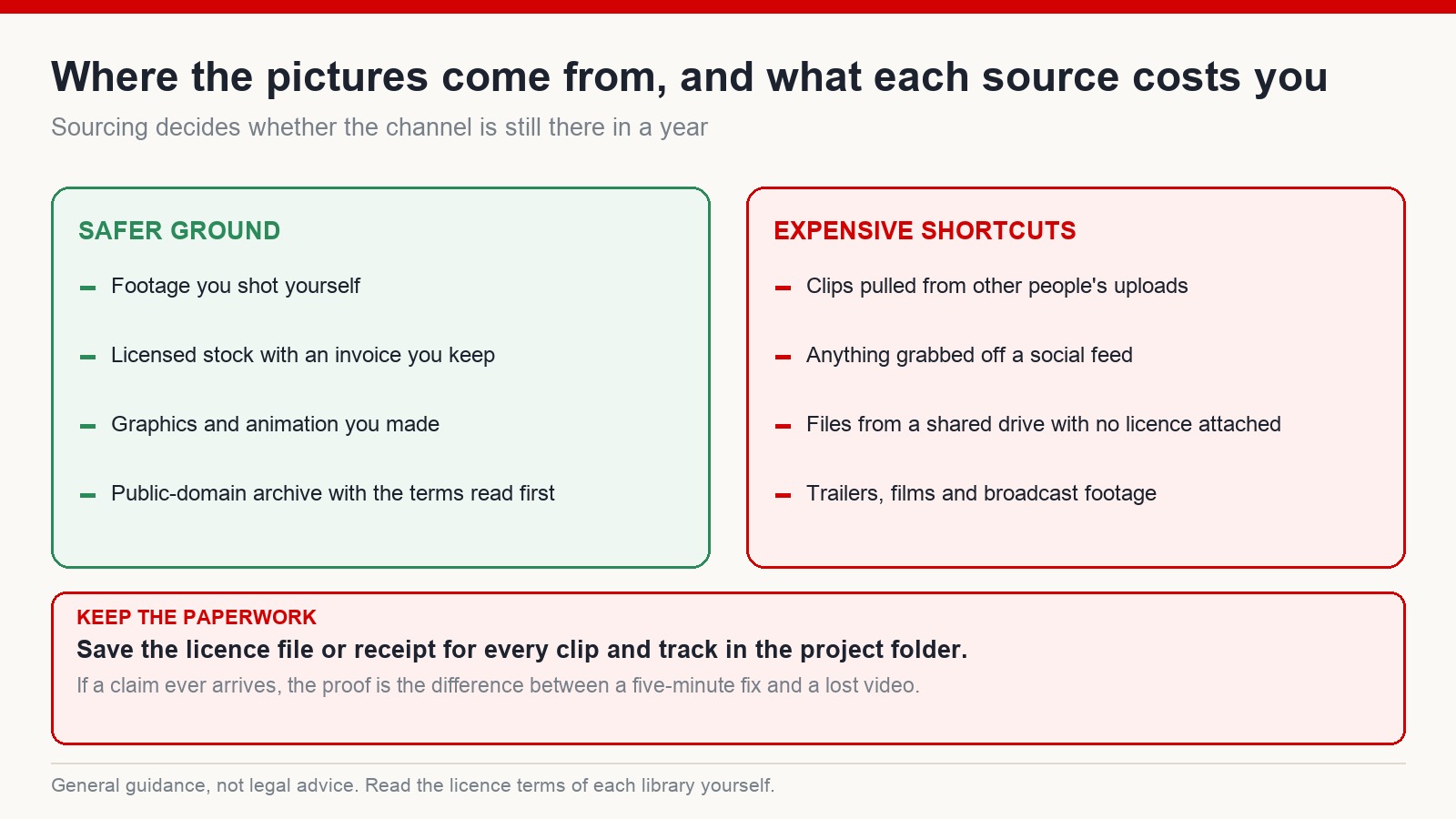
Footage you shot yourself is unambiguous. Licensed stock is fine as long as you keep the invoice. Graphics and animation you built are yours. Public-domain archive material can work, but read the terms rather than trusting the label on the page you found it on.
What does not work: clips pulled out of other people’s uploads, anything grabbed off a social feed, files from a shared drive with no licence attached, and broadcast or film footage. Some of that will pass a scan today. The risk with all of it is that it does not have to fail today.
One practical habit that costs nothing: keep the licence file or the receipt inside the project folder, next to the media. If a claim ever arrives, the difference between a five-minute fix and a lost video is whether you can produce proof without an archaeology expedition through your email.
A note on studying videos that work
Watching successful videos in your niche is not optional – it is how you learn what a good opening does, how quickly the payoff needs to start arriving, where a video changes direction. Do that regularly and deliberately.
What you must not do is download someone else’s material and rebuild it. Pulling captions from a video that performed well, running them through a rewriter and publishing the result is both a policy problem and a dead end. You get a channel with nothing of its own to stand on, and you have taught yourself nothing about why the original worked.
Study the structure. Write your own material inside it. Those are different activities, and only one of them is safe to build on.
Sound effects do more work than transitions
Since we are talking about what makes a picture land: ambient sound. A forest shot with birds in it and leaves moving is a different shot from the same footage silent. A street scene with distant traffic and footsteps has a place in it. Without them, footage sits on the screen instead of surrounding the viewer.
A single ambient layer under the narration, mixed low, does more for the feel of a video than a folder full of transition effects will. And when the narration pauses, let the ambience come up slightly. Silence with nothing in it reads as a mistake.
Frequently asked questions
Do I need to be fluent to edit in a language I do not speak?
No, but you do need to understand what each section of the narration is doing. Timed captions plus a translation pass give you that. Fluency helps with writing the script; it is much less important once the audio exists.
How long should a single shot stay on screen?
Long enough for the viewer to read it, and no longer. Wide establishing shots need more time than tight detail shots. Vary it deliberately – a run of shots all cut at the same length is what makes an edit feel mechanical.
Is stock footage a problem for originality?
Licensed stock is fine as material. The originality has to come from the script, the argument and the way the footage is arranged. A sequence of stock clips with nothing added on top is an assembly, not a video.
What is the fastest way to improve at shot selection?
Watch a video you admire with the sound off, then again with the picture off. You will notice things about pacing and register that are invisible when both are running together.
The short version
Convert the narration into something you can actually read. Ask what each section is doing rather than what it says. Choose shots by register, not by keyword. Cut slightly off the sentence boundaries. Source everything cleanly and keep the proof. Put ambience under the voice.
None of that is about language. It is about deciding, line by line, what the viewer should be looking at – which is the whole job.
If you want a structured route through the rest of the faceless workflow, that is what mmoyoutube.com is for. Results vary from channel to channel, and platform policies change – treat any process, including this one, as something to test rather than something guaranteed.